

Design and Debug Efficiency
The DDE system solves the problem of long offline communication between staff during the production process of laptops. It also provides an automatic comparison of hardware and software design data to reduce design errors, integrate reports and reduce RD debug time.
Team members
Wistron's User Experience Center
Project
Wistron Inc.
Device
Website

Background
Computer companies want to import SYSTEMS to improve the efficiency of the circuit board design process, quickly fix errors, and save on labor and time costs.
Problem
The circuit board design process is completely carried out by off-line communication. Circuit board design includes hardware design and software design, which requires inter-departmental collaboration.
But in the past, this process was done entirely through emails and meetings. When a circuit board design was wrong, it could take over a month for the software and hardware departments to go through the process of debugging.
Our Goal
To reduce error in the circuit design process, integrate reports and reduce RD debug time.
Designing a project-specific information integration platform, including a debugging system, that allows all departments to collaborate on the platform so that problems can be identified quickly and human error can be reduced.
Team
Working as a UX/UI Designer in this project
Product Owner
UIUX Designer
-
Interview with stakeholders
-
Design wireframes and user interface
-
Create design system
Scrum Master
Tech Leader
Tools
AdobeXD, Whimsical, Matomo Analytics.
Challenge
The computer manufacturing and foundry process is extremely complex, involving a wide range of departments and staff, including: the software department, the hardware department, the specifications department, the project management, the quality assurance department and management.
Each department has its own requirements. Multiple and complex requirements had to be integrated into a single product.

Design Process
We adopt a large Scrum approach to development, allowing two development teams to work in parallel. Both development teams work with the Project Owner every 2 weeks to write objectives.
Before the first Sprint begins, a Designer's Prior Sprint is started, which involves pre-research and interviews, as well as setting objectives with the Project Owner.
After the start of the Sprint, staff discuss and write a user story with the PO and interview and discuss it over the course of a week. A prototype design is also developed during the week and the feasibility of each solution is discussed with the Tech Lead during the Implementation phase and delivered to the RD team in the same week.


Interview
Interviews are conducted with representatives from relevant departments and experts to collate their pain points.
I also created flows and Wireframe as required, discussed the Wireframe with the Project Owner and presented the Wireframe to core users.
User Journey
Task process
1. In the initial version of the system, when creating a new case, there are some required fields, but because the prompts are not obvious, this can make it difficult to know how to complete the case opening process.
2. The information system indicates that an error has occurred, or that no information is available, which can leave the user unsure of how to make changes.

Solution
1. Re-adjust the order and logic of filling out the form. Fill in the necessary information first and display the steps above. Alternatively, allow the user to go back to the previous step and make changes.
2. Add relevant hints and help in the required fields, and hints in the error messages.
Stakeholder Map
In order to address the complex requirements in a fast-paced Scrum, I have designed a Stakeholder Map, which distinguishes the importance of users and the corresponding functions.

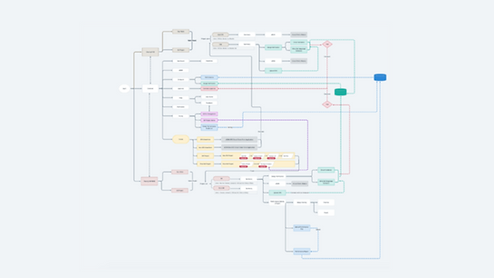
User flow
The whole system architecture covers the general processes that different users will undertake when using the system.

Key Design
1. Project bar display
browse more projects at once.
2. Viewer switching
Depending on the logged-in user department, the information corresponding to that department will be displayed, and you can switch the angle of view to see different aspects of the data.
3. Report integration
In the past, information was fragmented and scattered across departments. We designed an integrated report from the Quality Assurance Department's point of view so that the information is clear at a glance.
4. Debug Notification
The DDE system will help to debug and notify the relevant people automatically. I have designed a notification field and a letter template.


Wireframe & Prototype
Using highly simulated interactive prototyping
In agile development, design Iteration takes place every fortnight, so design specifications need to be delivered quickly to the R&D team.
As development speeds up, I cut out Wireframe and go straight to designing with high quality prototypes.
The first benefit is that I can get my design files closer to the product already in operation, and the second benefit is that I can deliver my design to the development team as soon as it is confirmed, thus eliminating the need to prototype the Wireframe again.
Usability
1. Setting up the test environment
Our development team has created three development environments: the development environment, the test environment, and the official environment.
Before it is officially launched to the real world, we will let potential users try out the product in a test environment and make adjustments based on their real feedback, so that the whole system can be brought to the official environment.
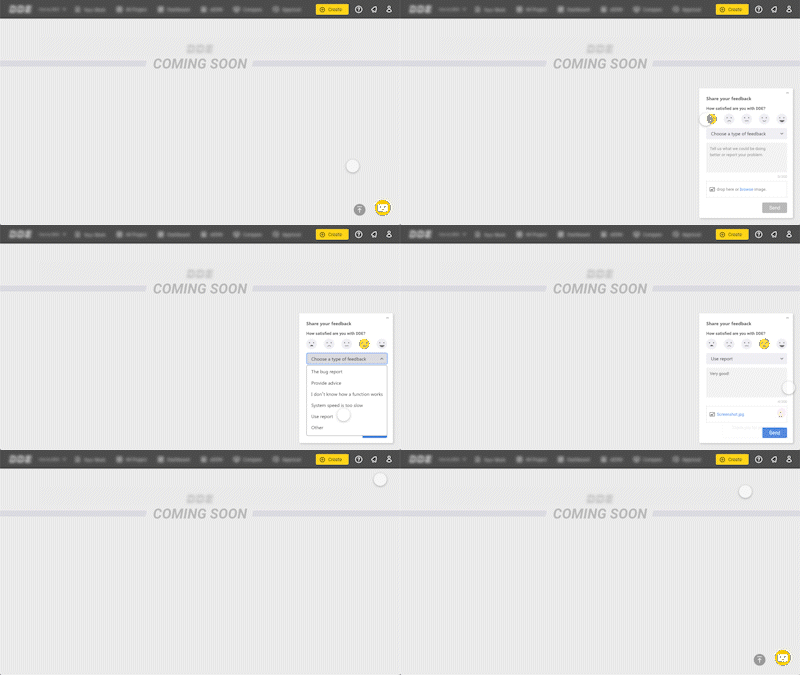
2. Designing the feedback system
The feedback system allows users to report problems with the system and rate it at any time.
Design System
I created a design system for DDE so that there is visual consistency across the components of the project. I designed interactive effects for each component, and designed icons and illustrations for the R&D team and other designers to collaborate and develop based on this design system.


Visual Style
For the visual aspect, I used a professional background of dark gray and complimented it with energetic yellow in this system. Then, I added a sense of speed to the logo design. Combined the circuit board with 0 and 1 representing software into the login page.


Impact
It optimizes the RD communication process, saving 0.7 Mn USD in manpower per year.
The actual number of users per month since launch is 349, half of whom are hardware engineers, and the average usage time is 11 minutes and 40 seconds.
Users can respond to test results and modify them through the sign-off process, enhancing the accuracy of the system.
It can be linked to other systems for quick browsing and online editing, reducing the cognitive burden and communication costs for users switching systems.
What I Learned
1. Scrum
Fortnightly Planning and Iteration allows me to quickly iterate on product development based on real user feedback, and to design products in a more efficient way.
2. Large team communication
During the weekly review or Retro, we will review our working style with the team members. This gives me a better understanding of how to communicate with people from different backgrounds and build a good working relationship with them.
3. Expertise outside of design
this project requires knowledge and understanding of industry-related knowledge. We had weekly meetings with experts in the field. Once I have gathered this knowledge, I will create a library of documents to understand the processes involved. Once I had gathered this knowledge, I created a library of documents to understand the processes involved.